
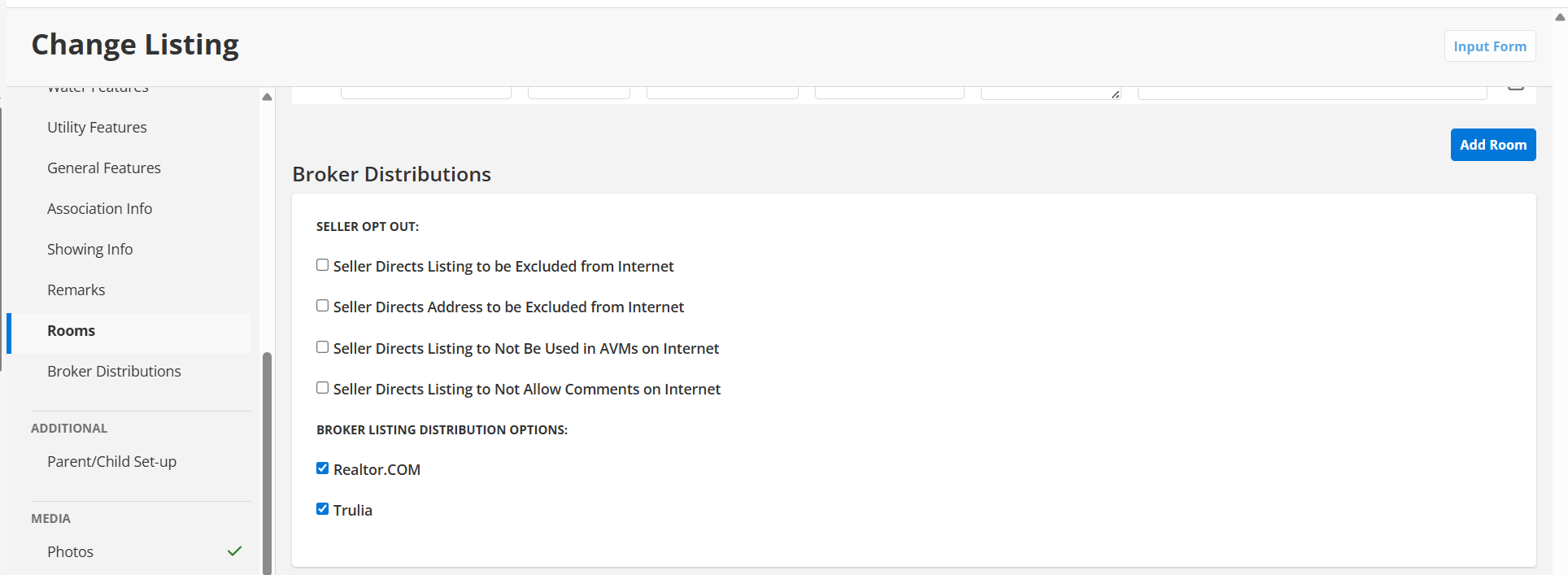
When a seller asks about privacy, you have answers built right into your MLS. The Greater Lansing MLS includes a set of seller opt-out options in Flexmls that let your client control how, and whether, their listing appears on the internet. These tools exist for one reason: to help you serve your sellers and document their wishes directly in the listing.
🔒 Seller Privacy Controls in Flexmls
Find these options under “Broker Distributions” when adding or editing a listing. Here’s what each setting does:
🌐 Keeping a Listing Off the Internet Entirely
If your seller requests that the listing be withheld from publishing online, select Seller Directs Listing to be Excluded from Internet. A seller can also request that only the property address be withheld. These selections govern all Internet sites, including Realtor.com and IDX sites, and the system will prevent you from making contradictory choices in the other checkboxes on the page.
📊 Turning Off Estimated Prices
The setting Seller Directs Listing to Not Be Used in AVMs on Internet refers to automated valuation models on virtual office websites (VOWs) — the estimated prices some sites display alongside a listing. Selecting this option stops the estimated price from showing, so the listing displays either the actual price or no price at all.
💬 Disabling Public Comments
Some real estate sites allow public comments on listings. The option Seller Directs Listing to Not Allow Comments on Internet also applies to VOWs only. Checking this box disables comments on the listing entirely.
🔒 This Is How the MLS Protects Your Clients
This is the kind of control a transparent marketplace makes possible. Your MLS sets the rules that protect your client’s choices across every site their listing touches — and that protection travels with the listing automatically.
Have Questions About These Settings?
If you want to learn more about privacy options or need a walkthrough of the Flexmls settings, the GLAR MLS team is here to help.